
The short version of web design vs web development: design decides what your website says, how it looks and how visitors move through it; development turns that plan into working code, connects it to data and keeps it running on a server. Most business websites need both, but not always in equal measure. This guide explains the roles, skills, deliverables and tools on each side, where they overlap, and which one you actually need for the job in front of you.

In short:
- Designers decide structure, content and look, and hand over wireframes, mockups and a style guide. Developers build and run the site, and hand over working code on a live server.
- Front-end development runs in the visitor's browser; back-end development runs on the server and handles data, forms, accounts and payments.
- The two meet on responsiveness, accessibility, speed, Arabic and English layouts, and SEO. Most website problems start in the gap between them.
- A standard business website rarely needs two separate hires. Custom systems, integrations and portals need a real development team.
- Match the job to the skill: an outdated look is a design job, a broken form is a development job, and low enquiries are usually both.
In this guide
Web design vs web development: the difference in plain terms
Think of a new branch office. One person decides where reception goes, what the signs say and which colours match the brand; another runs the cables, connects the phones and makes the door locks work. A website works the same way.
- Web design is the planning and visual side. It covers who the site is for, which pages it needs, what each page says, the order of the content, the layout on a phone and on a computer, colours, typography, images, buttons and the path a visitor takes from landing to contacting you. The output is a plan you can see and click through, but it does not yet work on the internet.
- Web development is the building and running side. It turns the approved design into HTML, CSS and JavaScript that browsers understand, sets up the content management system, writes the server code that sends form messages, stores data, takes payments or logs customers in, and puts all of it on a secure, fast server under your domain.
A quick test helps. If the question is "what should this be, and how should it feel to use?", it is a design question. If the question is "how do we make this work reliably, securely and quickly?", it is a development question. "Should the booking button be green and sit at the top of the page?" is design. "Why does the booking form show a success message but no email arrives?" is development.
The line is not a wall, though. A designer who ignores how browsers behave produces pictures that cannot be built well; a developer who ignores the visitor builds a site that works and convinces nobody. If you want the wider picture of what design itself includes, start with our guide to what web design is and what it covers.
Roles, skills and tools on each side
Job titles vary. In a large company each role below is a different person; in a small studio one person may cover three. What matters is that every responsibility has an owner.
Design roles
UX designer
Works out what visitors need and how they move through the site. Skills: interviewing customers, organising pages and menus (information architecture), sketching user journeys, wireframing and simple usability tests. Our guide to UX and UI design goes deeper.
UI or visual designer
Gives the structure its look: grid, spacing, colour, typography, icons, buttons and imagery. Skills: visual hierarchy, brand application, colour contrast, pairing Arabic and Latin typefaces, and designing every state of a component, not just the happy one.
Content designer or copywriter
Writes headings, service descriptions, button labels, form messages and page titles. Often forgotten in quotes, yet the words do most of the persuading. In Saudi projects this usually means writing in Arabic and English, not translating one into the other.
Development roles
Front-end developer
Builds what runs in the browser. Skills: semantic HTML, CSS layout for every screen size, JavaScript for menus, sliders and form checks, right-to-left layouts, accessibility in code and page speed.
Back-end developer
Builds what runs on the server. Skills: a server language such as PHP, databases, user accounts and permissions, connections to payment gateways, SMS, accounting or ERP systems, and security.
Full-stack developer and hosting
A full-stack developer works on both front and back end. Someone also has to own the server: hosting, SSL, backups, updates and monitoring. On small sites this is usually the same person or provider.
The tools each side uses
You do not need to learn these tools, but knowing them helps you ask for the right files at handover.
| Purpose | Design side | Development side |
|---|---|---|
| Main workspace | Design tools such as Figma or Sketch, plus paper for early sketches | A code editor such as Visual Studio Code, and the browser's developer tools |
| Keeping versions | Version history inside the design file | Git, which records every code change and who made it |
| Building blocks | Component libraries, icon sets, font files | A content management system such as WordPress, frameworks such as Laravel, plugins and libraries |
| Checking quality | Contrast checkers, usability sessions, design reviews | Speed tests, accessibility checkers, form and payment tests on real phones |
Ask who keeps the source files. If design files and code stay in a provider's account and disappear, the next provider starts from screenshots.
Deliverables: what you actually receive from each side
The easiest way to understand the split is to look at what lands in your inbox at each stage. Design deliverables are things you review and approve. Development deliverables are things you test and use.
| Stage | Design deliverable | Development deliverable |
|---|---|---|
| Planning | Sitemap: the list of pages and how they are grouped in the menu | Technical plan: platform, hosting, integrations, plugins needed |
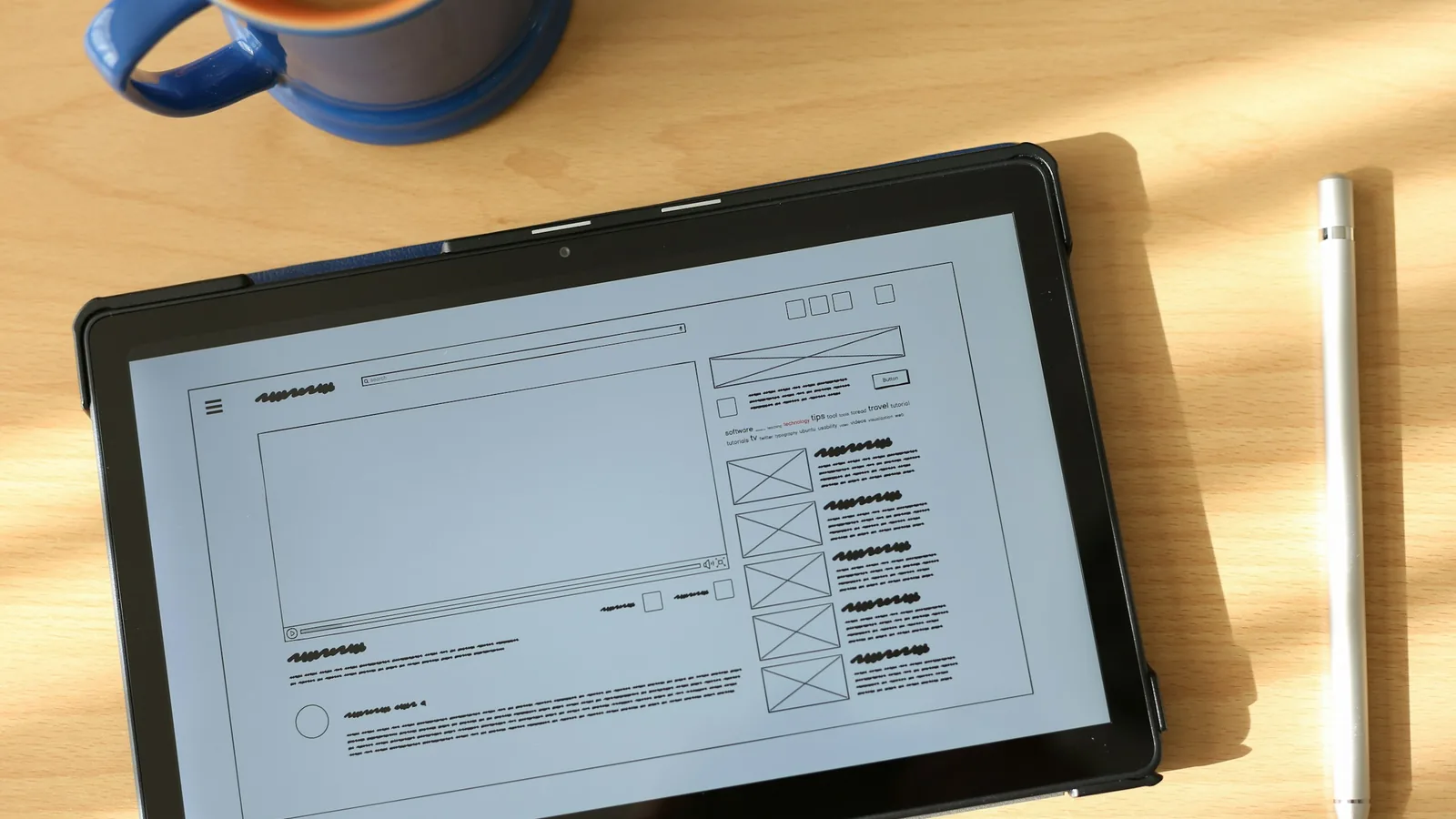
| Structure | Wireframes: grey boxes showing what goes where on each page, on phone and desktop | Data model for anything dynamic: products, bookings, branches, job openings |
| Look and feel | Mockups: full-colour designs of key pages, plus a style guide with colours, fonts and buttons | A theme or template set built from those mockups |
| Behaviour | A clickable prototype showing menus, forms and states such as errors and success messages | Working forms, search, filters, booking or checkout on a staging site |
| Content | Final copy and image selection for each page | Content loaded into the dashboard, with page titles and descriptions set for search |
| Launch | Design sign-off and a short guide to using the brand on the site | Live site on your domain with SSL, backups, a sitemap submitted to Google and dashboard access for you |
Two things on this list deserve special attention.
The wireframe is the cheapest place to change your mind. Moving a section on a grey sketch takes minutes. Moving it after the page is built, filled with content and tested can take days. If a provider skips straight to coloured mockups, ask to see the structure first, at least for the home page and one service page.
The staging site is where you test, not where you admire. Open it on your own phone, fill in every form with a real email address and check the message arrives, tap the WhatsApp button and switch languages. A design approval tells you the plan is right; a staging test tells you the build matches it.
At the end, ask for a handover list: dashboard access, domain details in your company's name, where backups are stored, which licences renew, and who to call when something breaks. Our website brief template helps you set these expectations before work starts.
Front-end vs back-end development
Development itself splits into two halves, and the difference explains why some quotes are many times larger than others.
Front-end code runs inside the visitor's browser. MDN, the developer documentation maintained by Mozilla, describes client-side code as mainly concerned with the appearance and behaviour of the page, written in HTML, CSS and JavaScript. That is the layer that turns a designer's mockup into something you can scroll, tap and read on any screen.
Back-end code runs on the server. According to the same MDN guide, server-side code mostly decides which content is sent back in response to each request, and handles tasks such as validating submitted data and working with databases. It can be written in many languages, including PHP, which WordPress and Laravel use.
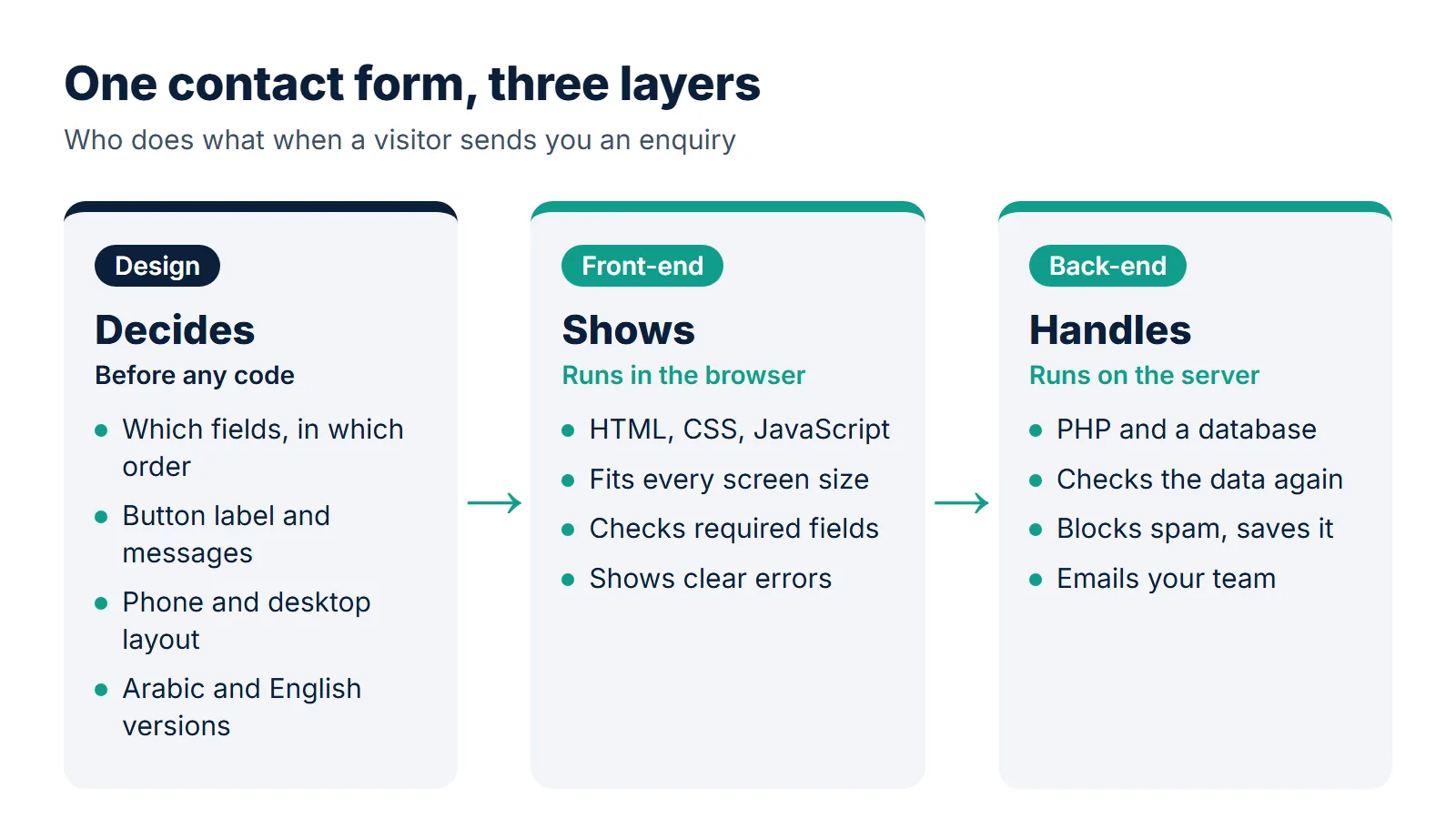
One feature, both halves
Follow a single "request a quote" form through a contracting company's site:
- The designer decides the fields (name, mobile, city, project type, description), their order, the button label and the message shown after sending.
- The front-end developer builds the form so it works with a thumb on a phone, shows the number keypad for the mobile field, checks that required fields are filled before sending and shows clear errors in Arabic and English.
- The back-end developer receives the submission, checks it again on the server (browser checks can be bypassed), blocks spam, saves the enquiry, emails it to the sales team and, if needed, pushes it into a CRM.
On WordPress, most of the back-end for a form like this already exists in the platform and a well-maintained plugin, which is why a brochure site is mostly design and front-end work. A booking system with branches, time slots and deposits is the opposite: most of the work sits on the server.
| Front-end | Back-end | |
|---|---|---|
| Runs on | The visitor's phone or computer, in the browser | Your web server |
| Main languages | HTML, CSS, JavaScript | PHP, Python, JavaScript (Node.js) and others, plus a database |
| Typical tasks | Layouts, menus, sliders, form checks, animations, right-to-left support | Forms that send and store data, accounts, payments, search, integrations |
| When it breaks, you see | A layout that overlaps on mobile, a menu that will not open, a slow page | Missing emails, failed payments, errors after login, lost data |
| Who you need | Every website | Mainly sites with data, accounts, payments or custom logic |
If you are unsure whether your idea needs custom back-end work or a platform will do, our comparison of WordPress or custom code walks through that decision.
Where design and development overlap
Most problems owners notice after launch live in the overlap, where each side assumed the other would handle it. Watch these areas.
Responsive layouts
A desktop-only mockup leaves the developer to guess what happens on a phone. The guess is usually "stack everything", which pushes the call button below three screens of text. Ask for mobile designs of key pages. In Saudi Arabia, where many visitors arrive from a phone, the mobile layout often is the website. Our article on designing for mobile first covers the details.
Accessibility
Accessibility is shared by design. The W3C Web Accessibility Initiative publishes the Accessibility Roles and Responsibilities Mapping (ARRM), which assigns accessibility tasks to roles such as UX designer, visual designer, content author and front-end developer, with a primary owner who is accountable and secondary roles that help. In practice: the designer chooses colours with enough contrast and visible focus styles, the writer writes clear link text and image descriptions, and the developer builds proper headings, labels and keyboard support. If only one side cares, the site fails. Our website accessibility checklist lists the essentials.
Speed
Google's Core Web Vitals, explained on web.dev, measure loading (Largest Contentful Paint, good at 2.5 seconds or less), responsiveness (Interaction to Next Paint, good at 200 milliseconds or less) and visual stability (Cumulative Layout Shift, good at 0.1 or less). A full-screen video, five web fonts and an image carousel are design decisions before they are code; development decides how efficiently they load. Agree on a speed budget early, and see why it matters for revenue in how website speed drives sales.
Arabic and English
Bilingual sites expose gaps fast. Arrows and progress steps must flip direction, phone numbers and prices must not, and mixed Arabic-English lines need care in code. The designer should design at least one key page in both directions; the developer should use direction-aware CSS rather than mirroring by hand. More in our bilingual website design guide.
SEO and the editing experience
Search visibility needs clear structure and useful content (design and writing) as well as clean code, correct titles, a sitemap and fast pages (development). Likewise, if the designer creates fifteen unique layouts, the developer must make each one editable, or your team will fear touching the site.
The states nobody designed
Mockups show a perfect page. Real sites also show empty search results, form errors, a sold-out product, a 404 page and a very long Arabic company name. If these states are not designed, developers improvise, and it shows. Ask for a list of states, not just pages.
Most website problems are not design problems or development problems. They are handover problems.
How a typical website project splits the work
Here is how a standard business website moves from idea to launch, and who leads each step. Skipping a step does not save its cost; it moves it later, where it costs more.
Discovery (design leads)
Goals, audience, competitors, services to highlight and what a successful enquiry looks like. A developer should join briefly to flag anything technical, such as an existing booking system or a payment requirement.
Sitemap and content (design and writing lead)
The list of pages, the menu and a first draft of the words. Content before layout is the single habit that most improves small business sites.
Wireframes and visual design (design leads)
Structure first, then look and feel, on phone and desktop. The developer reviews before you approve, to catch anything slow or hard to edit.
Build (development leads)
Theme and templates, the content management system, forms, integrations and hosting on a staging address. The designer checks the build against the approved designs.
Content entry and testing (both)
Real text and images go in, then testing on real phones and computers: forms, links, both languages, speed and accessibility basics.
Launch and after launch (development leads)
Moving to your domain, SSL, Search Console and sitemap, then updates, backups and small edits. Design returns whenever you add pages or campaigns. Our guide on what to do after your website launches covers this stage.
How the balance shifts by project type
The same steps apply to every project, but the weight moves. Four common Saudi examples:
- A dental clinic's company site. Mostly design, content and front-end: services, doctors' specialities, location, a booking request form and a WhatsApp button. On WordPress the back-end is largely ready-made. The risk is generic design and weak content, not code.
- A store on Salla or Zid. The platform already supplies the development: checkout, payments, shipping options and the dashboard. Your project is theme design, store structure, product pages, banners and setup. You are buying design and configuration, not programming.
- A landing page for an ad campaign. Almost entirely design and copy: one message, one offer, one form. Development is light but must be fast and must track conversions correctly.
- A training centre portal with registrations, payments and certificates. Mostly back-end: accounts, course schedules, payment gateway integration, admin reports and data protection. Design still matters for the forms and dashboards, but the development effort dominates the timeline and budget.
A clinic brochure site priced like a portal is overpriced; a portal priced like a brochure site will end badly.
Which one does your business need?
Start from the job, not the job title. This table covers common requests from business owners.
| Your situation | Mainly design | Mainly development | What to ask for |
|---|---|---|---|
| You have no website yet | Yes | Yes, usually on a ready platform | One provider who handles both, with content included |
| The site works but looks dated | Yes | Some, to rebuild the templates | A redesign that keeps your URLs and rankings |
| Visitors arrive but few contact you | Yes: structure, content, calls to action | Some: tracking, form reliability | A review of the visitor journey and the forms |
| A form or payment fails | No | Yes | A developer or maintenance provider, quickly |
| The site is slow | Partly: heavy images, video, fonts | Yes: hosting, caching, code | A speed audit that names both kinds of fixes |
| You need English next to Arabic | Yes: layouts in both directions, content | Yes: language switching, URLs, hreflang | A bilingual plan, not a translation plugin alone |
| You need bookings, accounts or an ERP link | Some: forms and dashboards | Yes, mostly | Custom development with a written scope |
| You want to sell online | Yes: store design and product pages | Depends on the platform | Compare Salla, Zid and WooCommerce first |
When one provider for both is the right call
For company profile sites, clinics, restaurants, law firms and contractors, a single provider who designs and builds on a proven platform such as WordPress is usually the sensible route: one point of responsibility and no handover gap. The trade-off is that you depend on their skill on both sides, so look at live sites they built, not just mockups.
When you need separate specialists
Separate teams make sense when the website is the product: a marketplace, a customer portal, complex permissions or several internal integrations. A design specialist protects usability while developers protect security, data and scale. Make sure one person, on your side or theirs, owns the handover.
What goes wrong with only one side
Design without development
Beautiful files and nobody to build them, or a build that drifts because the developer had to guess spacing, states and mobile behaviour.
Development without design
Everything works, but the site looks like a template with your logo on it, and visitors do not know what to do next.
Neither owns content
The designer used placeholder text, the developer loaded it, and a service page launches with "Lorem ipsum". Decide in writing who writes every page.
If you are weighing a freelancer against a company for this reason, our comparison of a freelance web designer vs an agency sets out the trade-offs honestly.
Questions to ask a provider, and what drives the cost
Whether you hire one provider or two, these questions show quickly whether both sides are covered.
About the design
- Will I see the page structure (wireframes or a sitemap) before the colours and visuals?
- Will you design the mobile version of key pages, and in both Arabic and English if I need both?
- Who writes the content, and is it written for Saudi customers rather than translated?
- How many rounds of revisions are included, and what counts as a revision?
About the development
- Which platform will you build on, and why that one for my project?
- Will I be able to edit text, images and new pages myself from a dashboard?
- Where is the site hosted, who updates the software and plugins, and how often are backups taken?
- How do you test forms, speed and accessibility before launch?
- If I collect customer data, how will the site handle consent and privacy? Saudi Arabia's Personal Data Protection Law applies; see our PDPL website compliance checklist.
About ownership and the handover
- Is the domain registered in my company's name?
- Who owns the design files and the code, and can I take them if I leave?
- What does a small change cost after launch, and how fast is it done?
Warning signs: a quote with one total and no list of pages or features; a provider who cannot explain which parts are design and which are development; no staging site before launch; and any promise of first place on Google. Nobody can guarantee rankings. For the full selection process, see how to choose the right provider.
What drives the cost on each side
Prices vary widely, but the drivers are predictable, and knowing their side helps you cut in the right place.
| Design cost drivers | Development cost drivers |
|---|---|
| Number of unique page layouts, not number of pages | Custom features: bookings, calculators, member areas, filters |
| Research and testing with real customers | Integrations: payment gateways, SMS, ERP, CRM, accounting |
| Custom illustration, icons and photography | Data migration from an old site or system |
| Content writing in one or two languages | User accounts, roles and permissions |
| Rounds of revisions and number of decision-makers | Security, performance and hosting requirements |
| A full brand identity versus applying an existing one | Ongoing maintenance, updates and support after launch |
Save by reusing a few good templates across many pages, using a proven platform when your needs are standard, and preparing content early. Do not save on content, mobile layouts, form testing or maintenance. For typical price ranges in the Kingdom, read our guide to website design costs in Saudi Arabia.
How Webnaa handles design and development
Webnaa is a website design service in Saudi Arabia, based in Riyadh. We keep design, content and development under one roof, so there is no handover gap for you to manage.
For company and business websites, our website design service starts from SAR 39 a month, paid every 6 months or yearly at 10% off, with no setup fee and no long contract. For a two-language WordPress site of 5 pages, at SAR 324 a month, that one fee covers both sides of the work:
- Design and content: a professional layout for your business, 5 pages, each in Arabic and English, content written for you, and a design you review on a preview link before launch. If you do not like the design during the design stage, a money-back guarantee applies, per the refund policy.
- Development and running: a WordPress site with an easy dashboard, an order or enquiry form, photo gallery, map location, WhatsApp button and direct call number, built fast and mobile-friendly, then tested on phone and computer.
- Launch and after: hosting, SSL and a standard domain registered in your name, Search Console and sitemap setup, privacy policy and terms pages, a printable QR code, technical support, and free fixes for any technical fault caused by how we built the site. You edit the site yourself from the dashboard.
We send the preview link within 24 hours at most from receiving all the information and content we need from you. From the second year you pay the monthly base only. Buying the website is optional: in this example it costs SAR 4,665 (the website value plus a 30% independence fee) and includes a year of hosting and the domain in your name. Work out the price for your own site in our price calculator.
Choose what you need, see your exact price
The price updates with every choice. No surprises, no hidden fees.
The calculator is off. Press the power button to start
Where will your website live: on a Webnaa address, or on a domain in your business name?
Who edits your website after launch? On static we edit it for you; on WordPress you edit it yourself from a dashboard.
How many languages will your visitors read?
How many pages does your business need? If you are not sure, five pages suit most businesses.
A subscription paid every 6 months or yearly that keeps your website with us, or buy the website in one payment and own it.
From Zoho, a global provider with data centres in Riyadh and Jeddah. More than 10 addresses are quoted separately.
When your project is mostly development, such as a portal, booking system or internal tool, our custom web development service builds it in PHP and Laravel, priced by a written quote with the scope and delivery date agreed before work starts. We also handle Salla and Zid store design, WooCommerce stores, redesigns and maintenance, each quoted in writing.
Design and development in one subscription
See what is included in a Webnaa business website, then send us your details and review the design on a preview link.
FAQ
Is web design the same as web development?
No. Design plans the content, structure and look of a site and produces wireframes, mockups and a style guide. Development builds that plan in code, connects it to data and keeps it running on a server. Many providers offer both, which is why the terms are often mixed up.
Do web designers write code?
Some do. Many designers know enough HTML and CSS to build simple pages, and some work as designer-developers on WordPress. Complex projects usually separate the roles.
Which comes first, design or development?
Design comes first: goals, content, structure and visuals are approved before the build. A developer should still review the designs, so nothing slow or hard to edit reaches the build.
Do I need a web developer if I use WordPress, Salla or Zid?
For a standard site or store, the platform provides most of the development, so you mainly need design, content and setup. You need a developer for custom features, integrations, or when something technical breaks.
Which costs more, web design or web development?
It depends on the project. For a brochure website, design and content are usually the larger share. For portals, booking systems and integrations, development takes most of the budget and the timeline.
Summary
Design decides what your website says, how it looks and how visitors move through it. Development makes that plan work in every browser, connects it to data and keeps it fast and secure. Front-end work is needed on every site; back-end work grows with forms, accounts, payments and integrations. The two meet on mobile layouts, accessibility, speed, bilingual content and SEO, where most problems start. For a standard business website, one provider who covers both is usually the simplest route; for a portal, hire real development strength and make someone own the handover. Either way, test the staging site on your own phone before you sign off.
Sources: MDN: introduction to the server side, W3C WAI: Accessibility Roles and Responsibilities Mapping, web.dev: Web Vitals. Webnaa: how we work, pricing.